
OpenVPN for every client. One panel.
DemoVPN runs your OpenVPN server from the browser: users and certificates, access lists the firewall enforces, exits through branch FortiGates, a DNS filter and a live view of who is connected. One Go binary with SQLite — it replaces openvpn-ui and the shell sessions around it.
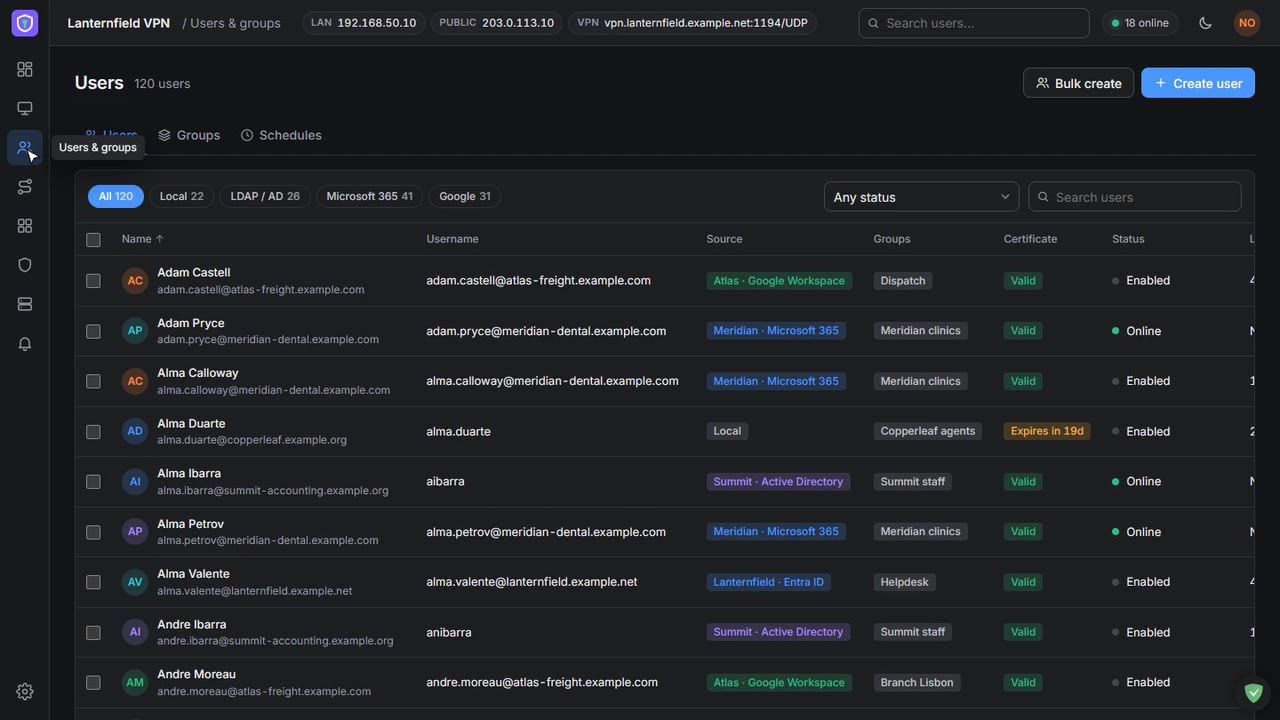
A synthetic MSP with 120 VPN users across four client companies, running live on the server.
Who is connected, from where, and how fast
- Every session in real time: throughput read from OpenVPN’s management interface, VPN and public address, uptime and bytes.
- Location, network and device: for each connection — “Windows 11, OpenVPN Connect, from a hotel in Paris” instead of a bare IP.
- Disconnect in one click: or open the user: certificate, groups, what they can reach and their last sessions.
- A dashboard per admin: drag, resize and pick widgets — top apps, blocked lookups, health, recent sessions.
Each user reaches
- Groups set the networks: their members get — or full tunnel — and the tunnel mode switches with one click; the device reconnects by itself.
- Access entries down to a port: 10.20.30.40 TCP 3389 gives the helpdesk RDP to one server and nothing else. Enforced in the server’s firewall, not just in pushed routes.
- Certificates handled: issue, revoke, reissue, warnings before they expire. Profiles as an .ovpn download or a share link that dies after three downloads.
- Microsoft 365, Google Workspace, Active Directory: users sync from mapped groups and sign in to the VPN with MFA in the browser.
Out to the internet through the right office
- FortiGate networks discovered: when you add one and every six hours — import them as routes for chosen groups.
- Internet exit per group or user: the Lisbon team browses with the Lisbon branch’s public address, through its FortiGate.
- Domain exits: send only the insurance portal through the clinic’s line, learned live by the panel’s DNS resolver.
- CLI for both FortiGates: the hub configured after a config backup, and a check of the address the exit really uses.
Scanners stay out. Users stay on track.
- Automatic bans: for sources that keep failing — TLS handshakes, wrong passwords, panel sign-ins — plus country blocks and the AbuseIPDB blacklist.
- A DNS filter on the tunnel: maintained blocklists, rules per group (no torrents, no social media for contractors) and a block page with access requests.
- Apps & traffic per user: which apps and sites each person reaches, kept 90 days.
- Alerts to Telegram and Slack: per event: connects with location, failed sign-ins, expiring certificates, backups, a daily digest.
See it running,
Narrated tours of the product on the same synthetic data. The live application itself is shown on a call.
The panel decides every connection
OpenVPN asks the panel about each client: the certificate must belong to an enabled user, the second factor must match their directory, and only their groups’ routes are pushed. If the panel is down, connected clients stay up.
Second factor per directory
Local users get a generated password; Microsoft and Google users sign in in the browser with MFA; Active Directory users bind with their own password.
Access lists in the firewall
Rebuilt atomically on every connect and change. Full-tunnel users still browse; everything internal they were not given is rejected.
Profiles people can use
A setup guide with download links for every platform, the profile by email or Telegram, and a self-service sign-up page for your directories.
Encrypted backups
Daily AES-256 archives to the server, Telegram, S3 or FTP with 14-day retention — and a restore from the panel, part by part.
More servers in one click
Deploy and harden a fresh VPS as a VPN node with the same users and certificates, or as an independent panel for a client.
Insights every morning
Unstable connections, failed handshakes, users who never connected, expiring certificates — with the log lines behind each one.
Built for people who run VPN for others
MSPs with many clients
Groups and directories per client company, and a VPN address per customer — vpn.customer-a.example.com — written into their profiles.
IT teams with branch offices
Users connect through their nearest branch and leave through it; the panel talks to the FortiGates so nobody types CLI on a Friday night.
Anyone tired of openvpn-ui
The panel owns server.conf and the firewall rules and regenerates them from Settings, keeping the previous config as a backup.
Auditors and owners
An audit log of every admin action, read-only admin accounts, an admin IP allow-list and HTTPS by default.
Your helpdesk
Search a user, see their last sessions and device, reissue a certificate and send a fresh profile — in under a minute.
Self-hosted
Runs next to OpenVPN on one small Linux VM. Your certificates and keys never leave your server.
Tell us what you're trying to achieve.
Book a 30-minute call or send a message and you'll reach a senior RHC Solutions consultant — not a ticket queue. Tell us how many VPN users and client companies you run, and which directories and firewalls are involved, and we'll come back with a walkthrough on a setup like yours within one business day.
Everything shown in this demo is synthetic: every company, person, number and address is invented. OpenVPN is a trademark of OpenVPN Inc.; FortiGate is a trademark of Fortinet, Inc.; UniFi is a trademark of Ubiquiti Inc. DemoVPN is not affiliated with any of them.