
Old mail out of Exchange.
DemoMail moves mail older than X days out of your Microsoft 365 mailboxes — across every tenant you look after — into your own Wasabi bucket, one .eml per message, filed exactly like the mailbox. It reads every copy back before it touches the original, and it touches nothing at all until a policy says so.
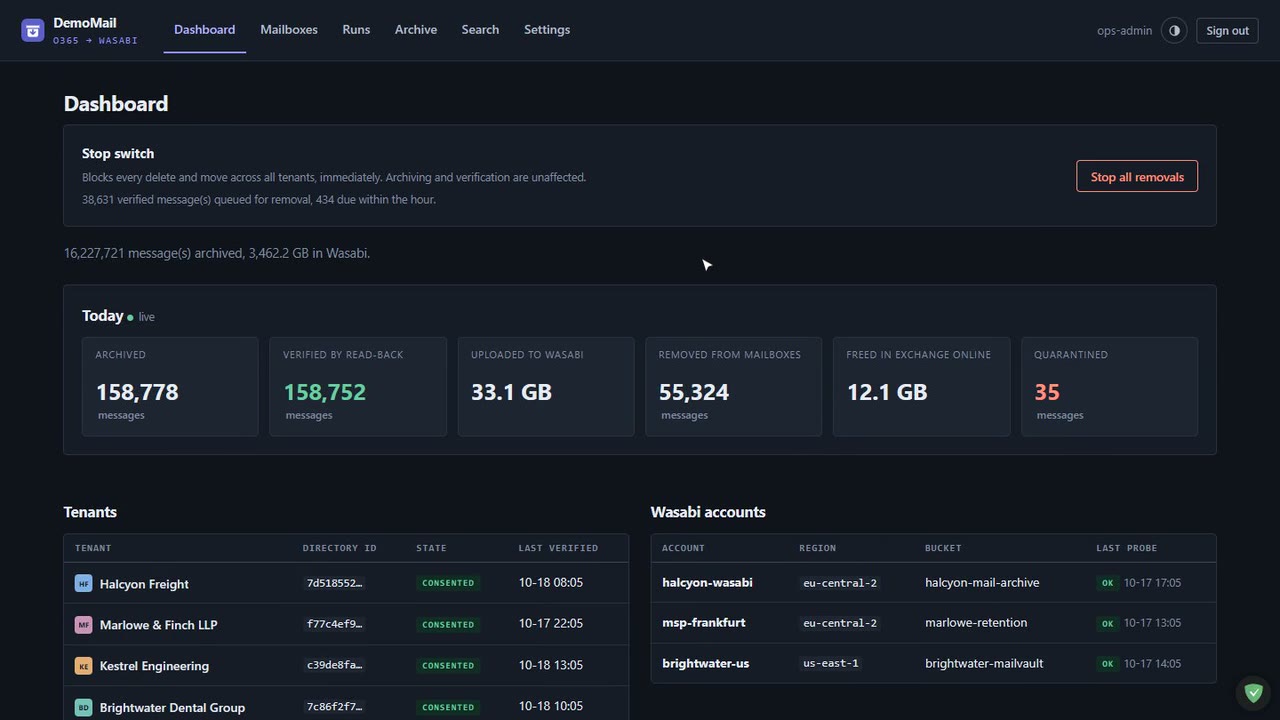
Four synthetic Microsoft 365 tenants and 292 mailboxes, archiving live on the server. Watch Exchange go down while Wasabi grows.
Which mailboxes are full, and what is being done
- Storage watch: for every mailbox in every tenant, fullest first, with alerts as it crosses 85, 90, 95 and 100%.
- Recoverable Items shown separately: purged mail still counts against the quota until Exchange clears it, and the console says so instead of looking broken.
- One stop switch: blocks every delete and move across all tenants at once. Archiving and verification carry on.
- A colour and a mark per tenant: because “which company is this row in?” decides whether a button is routine or a catastrophe.
Copy it. Prove the copy.
- The original: is fetched from Exchange Online as raw MIME — headers, body, attachments — and hashed while it streams.
- The copy: lands in Wasabi under a key that mirrors the mailbox, so the bucket reads like Outlook.
- The verify gate: reads the object back and compares length and SHA-256. A mismatch is quarantined and never deleted.
- The policy action: nothing, move, delete, or permanent delete — runs only on a proven copy. Try it yourself: permanent delete wants PURGE typed in.
Discovery fills the list. You decide what is archived.
- Users and shared mailboxes: found in every tenant — with the size, the quota and when anyone last used each one.
- Nothing is switched on by itself.: A mailbox needs a Wasabi account, a bucket and a policy before it is ever touched.
- A mailbox that leaves the tenant keeps its archive: it is marked and switched off, never deleted from the ledger.
- Bulk edits: by filter — every shared mailbox over 85%, say — and changes save as you make them.
Hundreds of mailboxes, one honest log
- Live progress per mailbox: folder by folder, scanned, archived, verified, removed, quarantined.
- Graph throttling handled: three requests per mailbox, many mailboxes side by side, every 429 waited out on its Retry-After.
- Scan only: counts what would be archived without writing a byte; dry-run reports list what a policy would remove, as CSV.
- Idempotent and resumable: a run that dies halfway picks up from the ledger.
Start at 90 days. Ratchet down when the reports look right.
- Age, folder scope and per-run caps: per policy; the floor is 7 days.
- After the copy verifies: nothing, move to a folder, delete to Deleted Items, or permanent delete.
- Dry run is a two-option choice: not a checkbox that can be lost on the way to the server.
- A guided “New policy”: that ends on a plain-English review of exactly what will happen.
See it running,
Narrated tours of the product on the same synthetic data. The live application itself is shown on a call.
From a 90-day-old message to a freed megabyte
One multitenant Entra application, consented per tenant with a device code. Your Wasabi keys, your buckets. A web console and a worker on one small Linux host you control.
Many tenants, one app
Deploy & consent signs in once as each tenant's Global Administrator with a device code. No portal clicking, no redirect URIs, and it grants only what is missing on a re-run.
The bucket mirrors the mailbox
One prefix per address, then the folder tree as the user nested it. Each object also carries mailbox, folder, ids and digest as metadata, so the archive describes itself.
Search and restore
One search across live mailboxes, the ledger and the bucket. Open a message safely — HTML sandboxed, no remote images — and put it back in its original folder.
Throttling is the only limit
Graph allows four requests per app and mailbox. DemoMail uses three per mailbox and runs mailboxes side by side, so bandwidth is never the bottleneck.
Alerts that mean something
Telegram messages when a mailbox crosses a quota band, a run fails, or discovery finds a change — and silence when nothing happened.
Everything in the log
Exactly one audit row for anything that changed state, plus every read that disclosed mail: opening, searching, downloading.
Why it fits an IT team or MSP
Self-hosted
Two services under systemd. Secrets encrypted with a key that lives outside the database. No environment variables to leak.
Your bucket, your keys
Mail goes straight from Microsoft 365 to a Wasabi bucket you own. Turn on versioning and Object Lock for retention you can prove.
Helpdesk can restore
A search-and-restore role finds a message and puts it back in its own mailbox — and can do nothing that deletes.
Sign-in that holds
Password plus authenticator app for everyone, or the domain password via on-premises AD, with Turnstile in front.
Who is still using it?
Last sign-in and last mailbox activity per mailbox, so 48 GB nobody has opened in two years stands out from 48 GB read every morning.
Works on a phone
The whole console, including the stop switch, is usable from a phone when a run needs stopping at 2 a.m.
Tell us what you're trying to achieve.
Book a 30-minute call or send a message and you'll reach a senior RHC Solutions consultant — not a ticket queue. Tell us how many tenants and mailboxes you look after, roughly how full they are and whether you have retention duties, and we'll come back with a walkthrough on numbers like yours within one business day.
Everything shown in this demo is synthetic: every company, person, number and address is invented. Microsoft 365, Exchange Online and Microsoft Entra are trademarks of the Microsoft group of companies; Wasabi is a trademark of Wasabi Technologies LLC. DemoMail is not affiliated with or endorsed by either.