
Every session. Every host.
DemoRDS watches your Remote Desktop Services farm: who is on which session host, why a session dropped, who is filling the profile disks, whether DFS is keeping up — and sends the reports management asks for, on schedule.
A synthetic farm — 3 collections, 12 session hosts, ~300 users in CORP.EXAMPLE.COM — running live on the server.
Who is on which host, right now
- Every connected user: with host, state, site, client OS, link quality, client name and IP — refreshed every 30 seconds.
- Disconnected sessions per collection: with how long each one has been sitting idle.
- Log a user off: from the same row, with a confirmation that says exactly which host and session.
- Connectivity checks: for domain controllers, the broker, file shares and every session host in one click.
"It kicked me out."
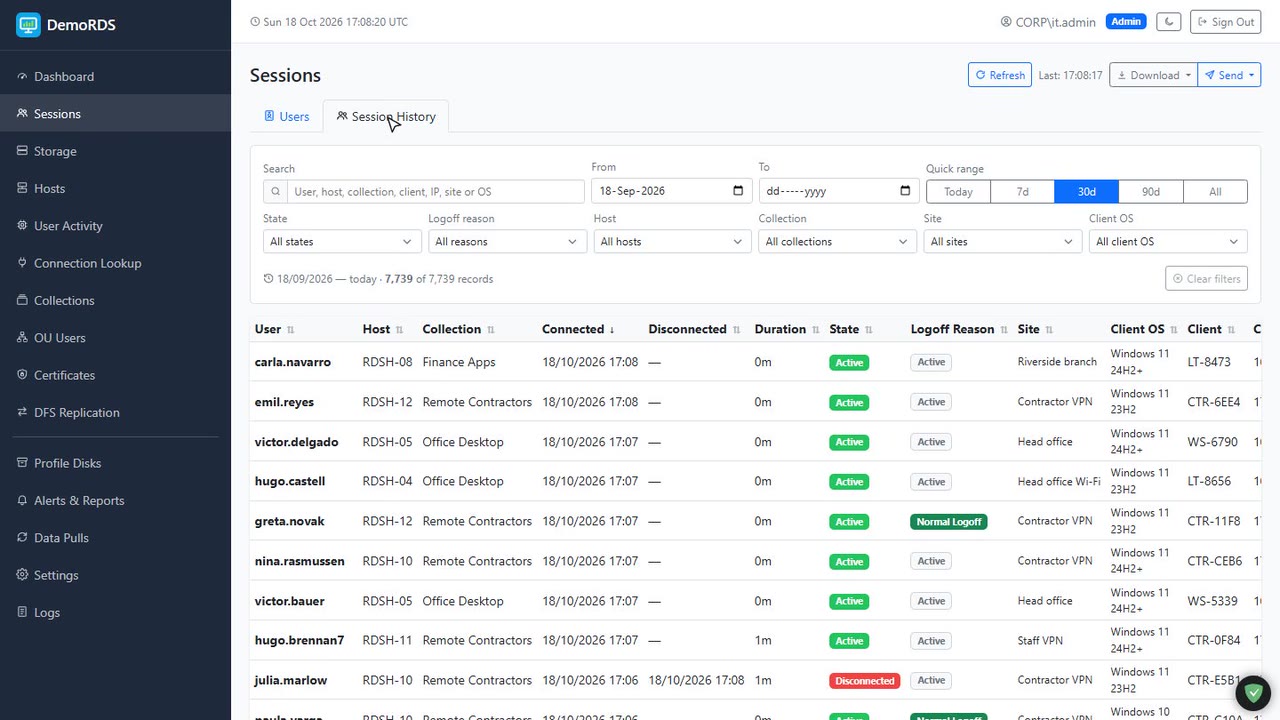
- Every session ending is labelled: normal logoff, timed out after disconnect, kicked by an admin, or vanished between polls.
- Filter 90 days of history: by user, host, collection, site, client OS and logoff reason — then export exactly those rows to CSV or PDF.
- Per-user view: online or not, OU, last host, last logoff type and total sessions.
- Logon loops caught: three failed logons in ten minutes usually means a locked profile disk — you get told which one.
Which host is drained, full or out of disk
- Every RDS server by role: session hosts, broker, web access, gateway, licensing, file servers.
- CPU, RAM and C: free space: per host with thresholds, and the sessions on it a click away.
- Drain mode read from the host itself: so "why does nobody land on RDSH-05?" answers itself.
- Collections: with hosts, RemoteApps, session counts and a logoff summary each.
Who is filling the profile disks
- UPD and home folder size per user: with warning and critical thresholds you set.
- Free space per file server volume: the number that predicts temp profiles and "Outlook cannot start".
- Copies that drifted apart: between file servers flagged, with the larger copy in bold.
- Quarantine, not delete: stale or orphaned disks moved aside reversibly, signed-in users skipped.
Is DFS keeping up?
- Every replication group and folder: sending and receiving member, state and backlog.
- Backlog spikes: highlighted as they happen — and seen clearing again.
- Errors kept as history: with the exact DFSR message, so "it was broken last night" is checkable.
- An alert rule: for replication errors, delivered to Telegram or Slack.
Reports management actually reads
- Alert rules: for disconnects, idle time, CPU, RAM, disk, profile quota, DFS errors and logon loops — scoped to the OUs you pick.
- Scheduled reports: active sessions every morning, who is still disconnected at close, storage over threshold, collection overview.
- Telegram, Slack or both: with a preview before you schedule and a send-now button.
- CSV and PDF export: on every data page, for the monthly pack.
See it running,
Narrated tours of the product on the same synthetic data. The live application itself is shown on a call.
Read from your farm, nothing installed on it
DemoRDS runs on one Windows server next to the farm. It asks the broker and each session host over PowerShell remoting, reads the profile shares over SMB, and keeps the history in SQL Server.
No agents
Session hosts are queried with PowerShell remoting and stored domain credentials. Nothing to deploy, nothing to update on the hosts.
Every logoff explained
Normal, timed out, kicked or vanished — worked out from the session's last state and your disconnect time limits.
Profile disks by name
UVHD-SID files are resolved to the user, compared across file servers, and measured inside the disk when you ask.
Your Windows sign-in
Integrated authentication with AD groups: admins see everything, helpdesk read-only, users only their own sessions.
Site and link awareness
Client subnets mapped to sites, client OS read from the RDP build, link quality estimated from round-trip time and bandwidth.
One instance per farm
For MSPs: a control plane provisions an instance per customer cluster, each with its own database and port.
Why it fits an RDS farm like yours
Helpdesk answers in seconds
"Which server am I on?" "Why was I logged out?" Search the user, read the row. No Server Manager, no event log digging.
Capacity you can show
Sessions per host and per collection, CPU and RAM over the day — the numbers behind "we need another host".
Storage before it bites
File server free space and the users behind it, so the profile share never fills up at 9 a.m. on a Monday.
Certificates that matter
The deployment certificate's expiry tracked separately from the self-signed listeners Windows renews itself.
Self-hosted
Runs as a Windows service or under IIS inside your network. Credentials stay in your SQL Server.
Built for MSPs too
One instance per customer farm, provisioned and updated from a control plane, each with its own alerts and reports.
Tell us what you're trying to achieve.
Book a 30-minute call or send a message and you'll reach a senior RHC Solutions consultant — not a ticket queue. Tell us how many session hosts and users you run, and whether you use profile disks and DFS, and we'll come back with a walkthrough on a farm like yours within one business day.
Everything shown in this demo is synthetic: every company, person, number and address is invented. Microsoft, Windows Server and Remote Desktop Services are trademarks of Microsoft Corporation; DemoRDS is not affiliated with Microsoft.