
Every firewall. Every client.
DemoGate shows every FortiGate you look after — health, WAN links, VPNs and alerts — and makes the routine changes for you: a CLI preview first, an audit trail always, a rollback when you need one.
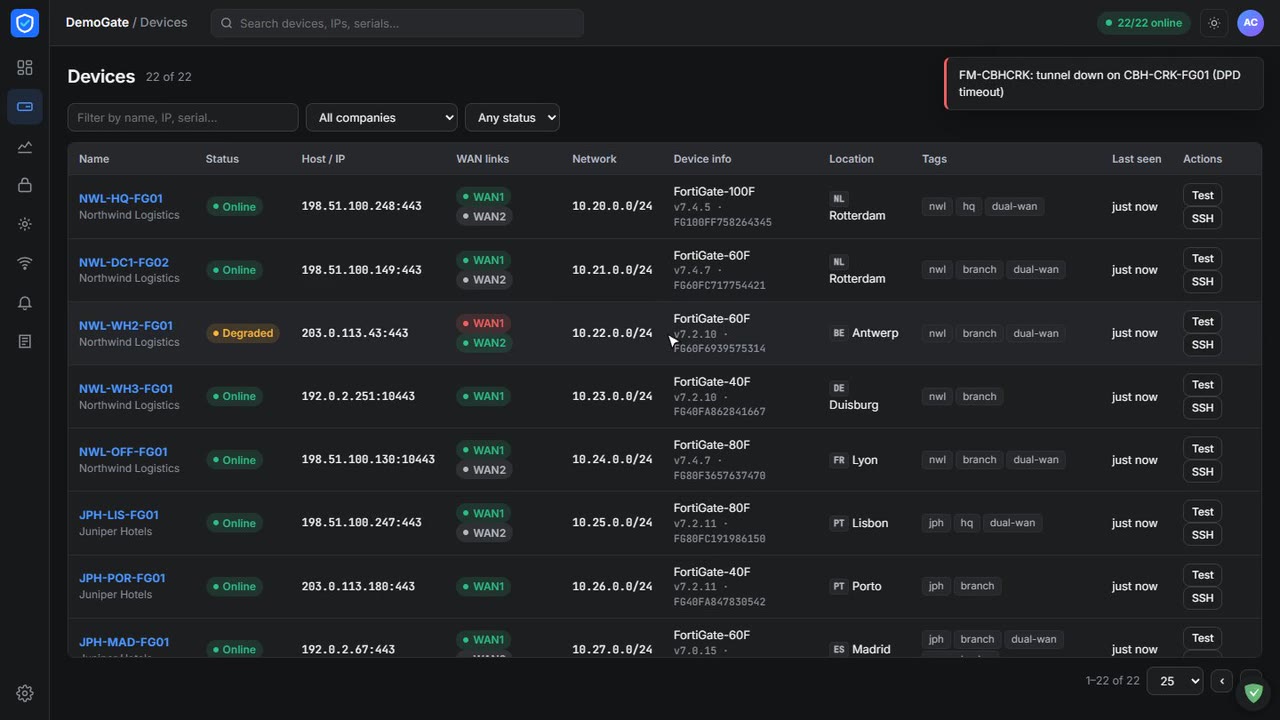
A synthetic fleet of 22 FortiGates across five companies, running live on the server.
The whole fleet, at a glance
- A card per FortiGate: online or not, model and firmware, CPU and memory, sessions with a sparkline, both WAN links and every tunnel.
- Grouped by client company: filter to one customer and see only their sites.
- Dual-WAN aware: when WAN1 drops you see the failover to WAN2 the moment it happens.
- One click into the box: Web UI or an SSH terminal in the browser, no jump host.
A tunnel to the office,
- Pick the FortiGate: subnets, WAN interface and services are filled in for you.
- Read the exact CLI: for both ends before anything is applied.
- Applied step by step: verified with a ping, and rolled back automatically if a step fails.
- Phase 2 health per tunnel: checked continuously, with an alert when one drops.
Paste a MAC. Get a fixed IP.
- The next free address outside the pool: is found for you — no spreadsheet of who has what.
- See which reserved devices are alive: online now, offline for days, never seen.
- Release stale reservations: in bulk, pin the ones that must never move.
- Exempt from the captive portal: in the same click for printers and cameras.
Know before the client calls
- Rules for what matters: device down, WAN failover, VPN down, high CPU, failed admin logins, policy changes.
- Straight to Telegram: per company or per team, and resolved automatically when it recovers.
- Every log type in one place: traffic, events, IPS, web filter, DNS — across all devices.
- Captive portal & guest Wi-Fi: with vouchers, Entra or LDAP sign-in and a full auth log.
See it running,
Narrated tours of the product on the same synthetic data. The live application itself is shown on a call.
From your FortiGates to every screen,
Nothing to install on the firewalls. DemoGate talks to the FortiGate REST API with a read-only key for monitoring, and an admin key only where you allow changes.
Preview before apply
Every change shows the equivalent FortiOS CLI first. Nothing touches a firewall until someone presses Apply.
Rolls back on failure
Changes are applied as steps. If one fails, the steps before it are undone — no half-built tunnels.
Audited by default
Who changed what, on which box, when — with the before and after of every object.
Encrypted backups
FortiGate configs backed up on a schedule, encrypted, and sent to a Telegram channel you choose.
Credentials in a vault
API keys and admin passwords sealed at rest; revealing one is logged with the user and reason.
An API for your tools
Scoped API keys per area and per FortiGate, with client IP allowlists and expiry dates.
Why it fits an MSP like yours
Works on the FortiGates you have
40F to 200F and up, FortiOS 7.0 to 7.4. An API key per device — no agent, no FortiManager licence.
Every client kept apart
Companies, each with their own devices, directories and default access. Staff see only what they are given.
Your sign-in
Microsoft Entra ID or Active Directory, with local accounts and two-factor for break-glass.
New site in minutes
Add a FortiGate, test the connection, and it appears on the board with its WANs and tunnels discovered.
Self-hosted
Runs on one small Linux VM behind your own tunnel. Your firewall credentials never leave your network.
Built for the night shift
Light and dark themes, dense tables, and alerts that say what broke and where — not just a code.
Tell us what you're trying to achieve.
Book a 30-minute call or send a message and you'll reach a senior RHC Solutions consultant — not a ticket queue. Tell us how many FortiGates you look after and for how many clients, and we'll come back with a walkthrough on a fleet like yours within one business day.
Everything shown in this demo is synthetic: every company, person, number and address is invented. FortiGate and FortiOS are trademarks of Fortinet, Inc.; DemoGate is not affiliated with Fortinet.