
Free your Zendesk storage.
DemoStash moves ticket attachments and inline images to your own Wasabi bucket, puts a secure link back in the ticket and redacts the original. Zendesk storage goes down every minute. Agents still open every file. Closed tickets are backed up every night.
Four synthetic Zendesk instances offloading live on the server. Watch the Zendesk figure go down.
All your Zendesk instances, side by side
- A card per Zendesk: subdomain, Wasabi bucket, tickets offloaded, attachments and inline images moved, tickets backed up, errors today.
- Red flags you can't miss: no offload in 2 hours, last backup had errors, tickets the offload could not finish.
- Built for MSPs: each tenant has its own credentials, buckets, schedule and its own database — nothing is shared.
- Add a Zendesk in five steps: each one tested before you move on.
The file moves.
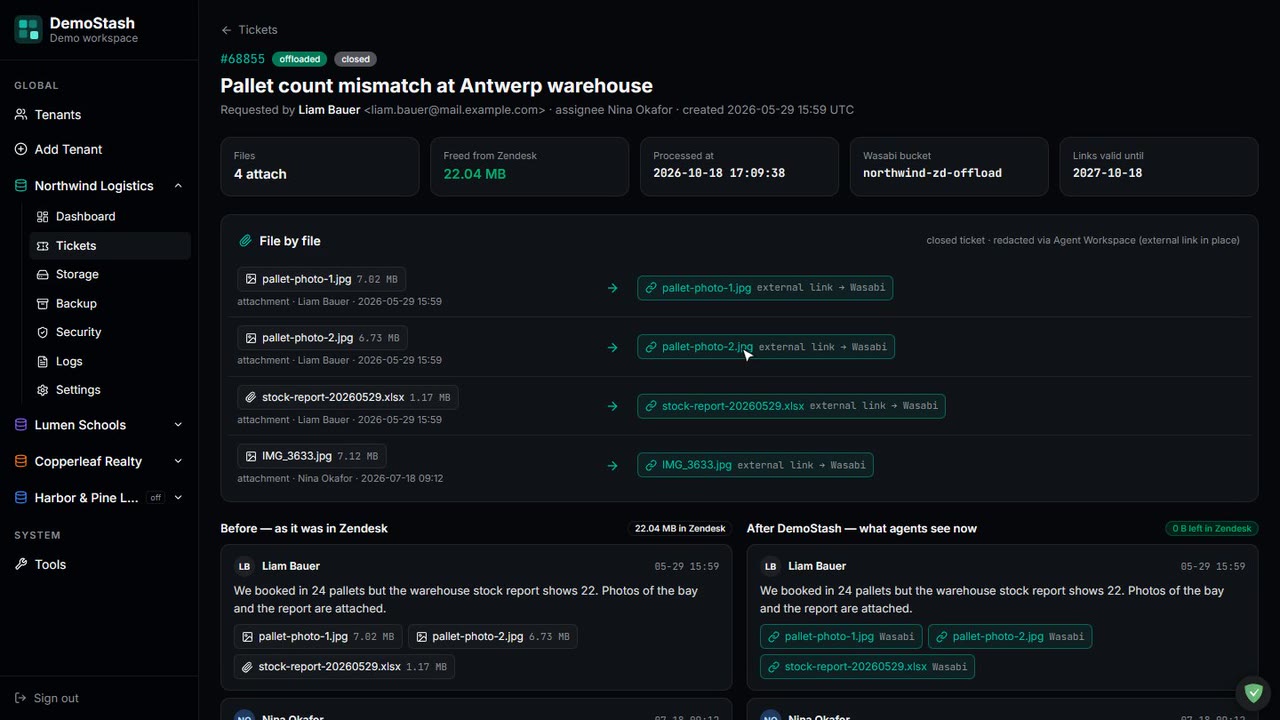
- The original is redacted: Zendesk keeps a tiny redacted.txt placeholder and stops counting the file against your storage.
- A secured link goes back in the ticket: [Attachment Secured: invoice-2291.pdf](https://s3.eu-central-2.wasabisys.com/…), valid for a year.
- Inline images too: pasted screenshots and email signature images, not just attachments.
- Nothing is redacted until the upload is verified: in your bucket, under YYYYMMDD/{ticket}_{date}_{file}.
See exactly what is filling your plan
- An hourly storage snapshot: of every ticket that still holds files in Zendesk — full scans and quick delta scans, with live progress.
- Biggest tickets first: with file and inline-image counts and the size of each.
- Used vs plan, in GB and %: so you know how much headroom is left — and watch it grow.
- Per ticket: what was offloaded, what was skipped, what failed and why.
Is it working? One look tells you.
- Tickets offloaded, saved to Wasabi, tickets backed up: and today's activity, refreshed every minute.
- The scheduler at a glance: offload and backup running, and when each runs next. Start or stop either one.
- Run an offload or a backup now: when you don't want to wait for the schedule.
- Recent errors with the reason: and a recheck every night at 02:00 that retries them.
Closed tickets, kept forever. A report every morning.
- Every closed ticket backed up nightly at 01:00: to a separate Wasabi bucket, as JSON and as a readable HTML page: YYYYMMDD/{id}_ticket.json + .html.
- A daily report to Telegram or Slack: offload runs, tickets, files, errors, backup totals and Zendesk storage against your plan.
- Quiet unless something happened: run notifications only when files were actually moved.
- IP allowlists per bucket: set as a bucket policy from the Security page.
See it running,
Narrated tours of the product on the same synthetic data. The live application itself is shown on a call.
From a solved ticket to a freed gigabyte, every minute
Nothing to install in Zendesk. DemoStash reads the incremental ticket API with an API token, writes to your Wasabi buckets with your keys, and runs on one small Linux VM you control.
Upload first, redact second
Each file is downloaded, uploaded and verified in Wasabi before the original is touched. If any step fails, the ticket is left as it was and logged.
Acts while tickets are solved
A continuous offload every 1–5 minutes catches tickets in the window where Zendesk still allows changes. A full pass runs every hour.
Closed tickets handled too
The Agent Workspace redaction endpoint swaps a closed ticket's file for an external link to the Wasabi copy — where the normal API refuses.
Nightly closed-ticket backup
At 01:00 every closed ticket is saved as JSON and a readable HTML page to a separate bucket. A recheck at 02:00 retries anything that failed.
Strict tenant isolation
A registry database plus one database per tenant. Credentials, buckets, logs and schedules never mix between Zendesk instances.
Bulk tools for the backlog
Mass offload from a CSV, bulk inline-image offload and bulk redaction — dry run by default, so you see the numbers before anything changes.
Why it fits a support team like yours
Self-hosted
Runs on one Debian VM under systemd. Your Zendesk token and Wasabi keys stay on your server; the files go straight to your own buckets.
Many Zendesks, one console
Look after several Zendesk instances — your own brands or your clients' — each with its own buckets, schedule and reports.
Your sign-in
Microsoft Entra ID single sign-on for the team, with a local login kept for break-glass access.
Agents notice nothing
The link to the file sits right where the attachment was. One click opens it from Wasabi, for a year.
Locked-down buckets
IP allowlists on each bucket, managed from the app as a bucket policy, so only your server and office can reach the files.
Tools when something is slow
Ping, traceroute, DNS lookup and a Wasabi speed test, run from the server itself, one click each.
Tell us what you're trying to achieve.
Book a 30-minute call or send a message and you'll reach a senior RHC Solutions consultant — not a ticket queue. Tell us roughly how much Zendesk storage you use, your plan limit and how many Zendesk instances you run, and we'll come back with a walkthrough on numbers like yours within one business day.
Everything shown in this demo is synthetic: every company, person, number and address is invented. Zendesk is a trademark of Zendesk, Inc.; Wasabi is a trademark of Wasabi Technologies LLC. DemoStash is not affiliated with or endorsed by either.