
Every TV in the building.
DemoSignage turns the TVs on your sales floor, warehouse, reception and canteen into news screens. Build a page from ready-made slides, pick the screens, set when it shows — every TV updates within seconds. No designers, no HTML.
An invented company with 10 screens in 6 departments, running live on the server.
Fill in a form.
- Nine ready-made layouts: hero, statement, cards & stats, checklist, steps, options, do & don’t, call to action, image + text.
- A live 1920×1080 preview: next to the form — what you type is what the screen shows.
- Wrap a word in *asterisks*: to light it up in the theme’s accent colour.
- Ticker, corner pop-ups and a live clock: with your own timing per slide.
Register a TV. Give it a playlist.
- Each TV gets its own link: open it on the screen’s browser, press fullscreen, done.
- One page or a rotation: each with its own time on screen.
- Schedule by day and time: the lunch menu from 11:30, the safety briefing at shift change — overnight windows too.
- Heartbeat built in: every screen checks in every 5 seconds, so you see at once when one goes dark.
Every department runs its own screens
- Pages and TVs belong to a department: sales, support, warehouse, reception, canteen, finance.
- Editors can be scoped: to their department: the warehouse lead manages the warehouse screens and nothing else.
- Company-wide pages: holidays, benefits, town halls — stay with the super admins.
- Clone a page: to start from a design that already works.
See what every screen is showing
- A live thumbnail per TV: rotating exactly like the real screen.
- Online or dark: with the last heartbeat — no walking the building to check.
- Schedule windows switch on their own: watch the warehouse docks flip to the shift handover.
- Edits land everywhere at once: when the sales numbers change, every sales screen follows.
See it running,
Narrated tours of the product on the same synthetic data. The live application itself is shown on a call.
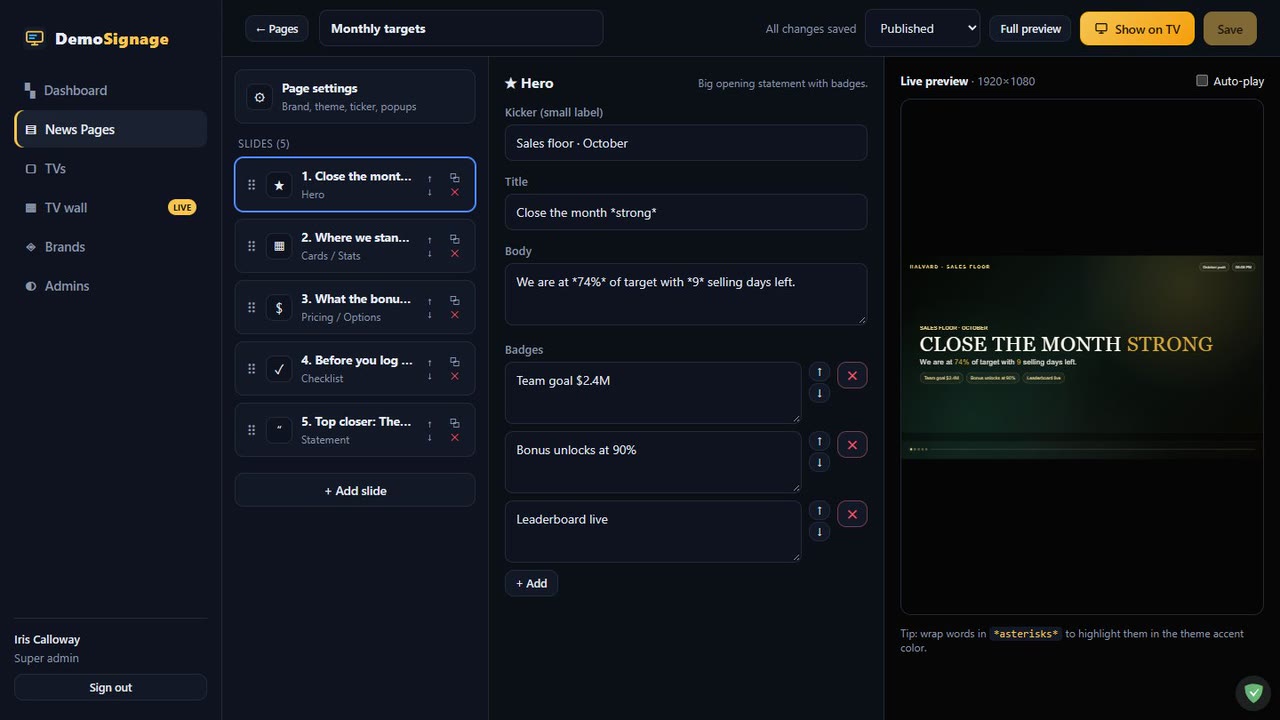
From a form to every screen in five seconds
Nothing to install on the TVs. Any screen with a web browser — a smart TV, a stick, a small PC — opens its display link and keeps itself up to date.
Build
Pick a layout, fill in the form, choose a theme. The preview is the exact 1920×1080 screen.
Publish
Drafts never reach a TV. Publish when it is ready — or clone a page that already works.
Assign
Give a TV one page or a rotation, each page with its own time on screen.
Schedule
Days of the week and a time window per page. The screen switches by itself when a window opens.
Watch
Every screen reports in. If one drops off the network you see it within 30 seconds.
Change anything, anytime
Edit a page and every TV showing it picks up the change on its next check-in.
Made for the screens you already have
Offices
Targets on the sales floor, the support queue by the help desk, benefits and holidays in the break room.
Factories & warehouses
Safety rules at the docks, shift handover at shift change, records that make people proud.
Clinics
Welcome screens in the waiting room, opening hours, and staff notices behind the scenes.
Retail
Today’s offers on the shop floor, targets in the back office — changed from head office for every store.
No designers needed
Layouts and themes are done for you. Anyone who can fill in a form can run a screen.
Self-hosted & simple
One small server with a single database file. Back it up by copying one file.
Tell us what you're trying to achieve.
Book a 30-minute call or send a message and you'll reach a senior RHC Solutions consultant — not a ticket queue. Tell us how many screens you have and where they hang, and we'll come back with a walkthrough set up like your building within one business day.
Everything shown in this demo is synthetic: every company, person, number and address is invented. All companies, people, departments, numbers and pages in this demo are synthetic. Illustrations are generated shapes, not photos. DemoSignage is not affiliated with any TV or display vendor.