
Every call. Every recording.
CallVault finds every recording in CommPeak's storage, links it to the right call record and copies it to a Wasabi bucket your company owns — each copy checked byte for byte. Your team searches, listens, reads the transcript and exports, without touching CommPeak.
A synthetic contact centre — three brands, six CommPeak accounts — running live on the server.
See it running, in under two minutes
Narrated tours of the product on the same synthetic data. The live application itself is shown on a call.
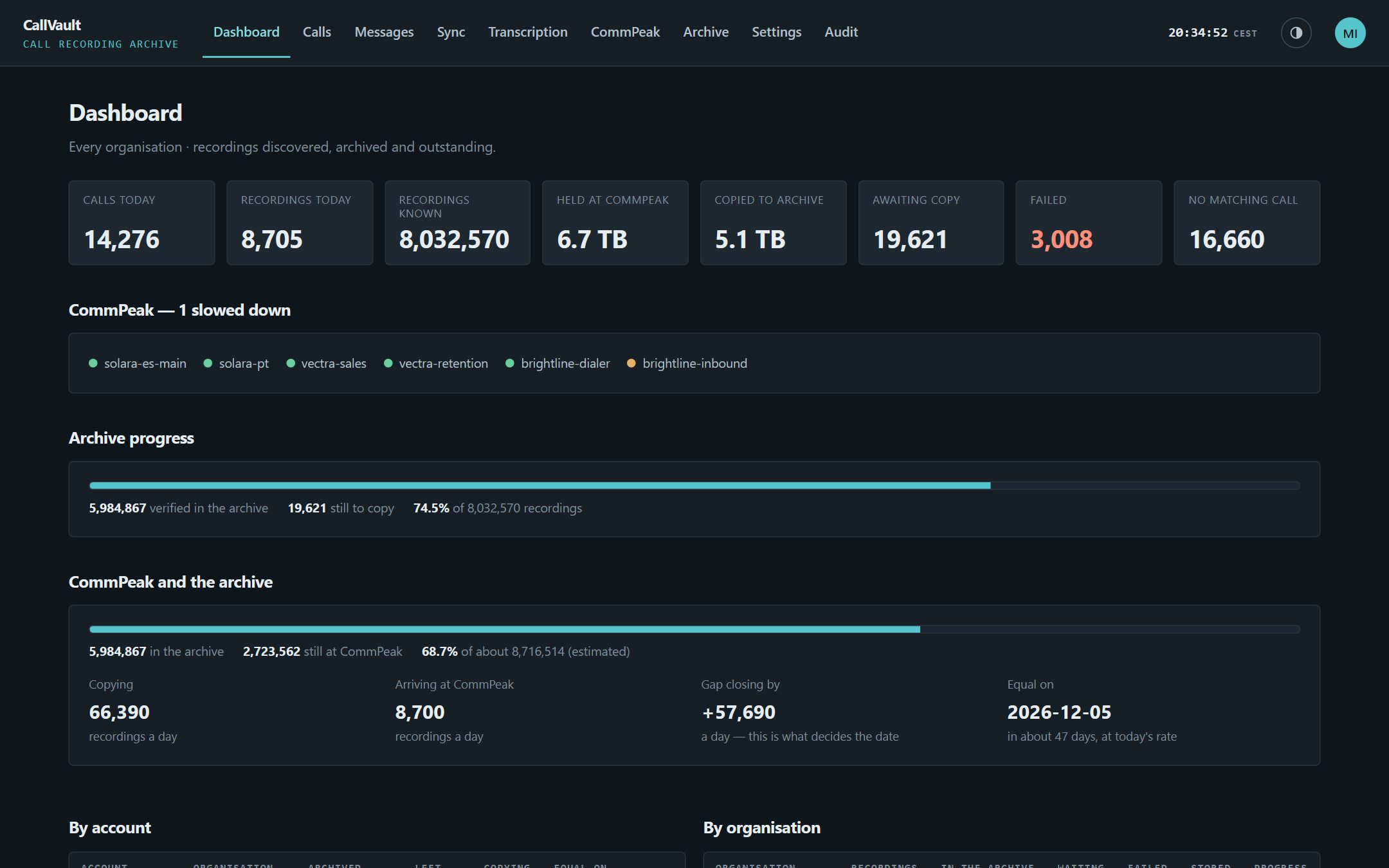
Know the day the archive catches up
- 1Eight numbers for the morning check: calls and recordings today, what CommPeak still holds, what is copied, waiting, failed, and recordings with no matching call.
- 2A date you can plan around: copying rate against arrival rate, per account. "Equal on" is shown only when the gap is actually closing.
- 3A light per CommPeak account: green, amber or red, so a refused key shows up before the backlog does.
- Every scan and poll listed: with what it found, what it queued and why it failed.
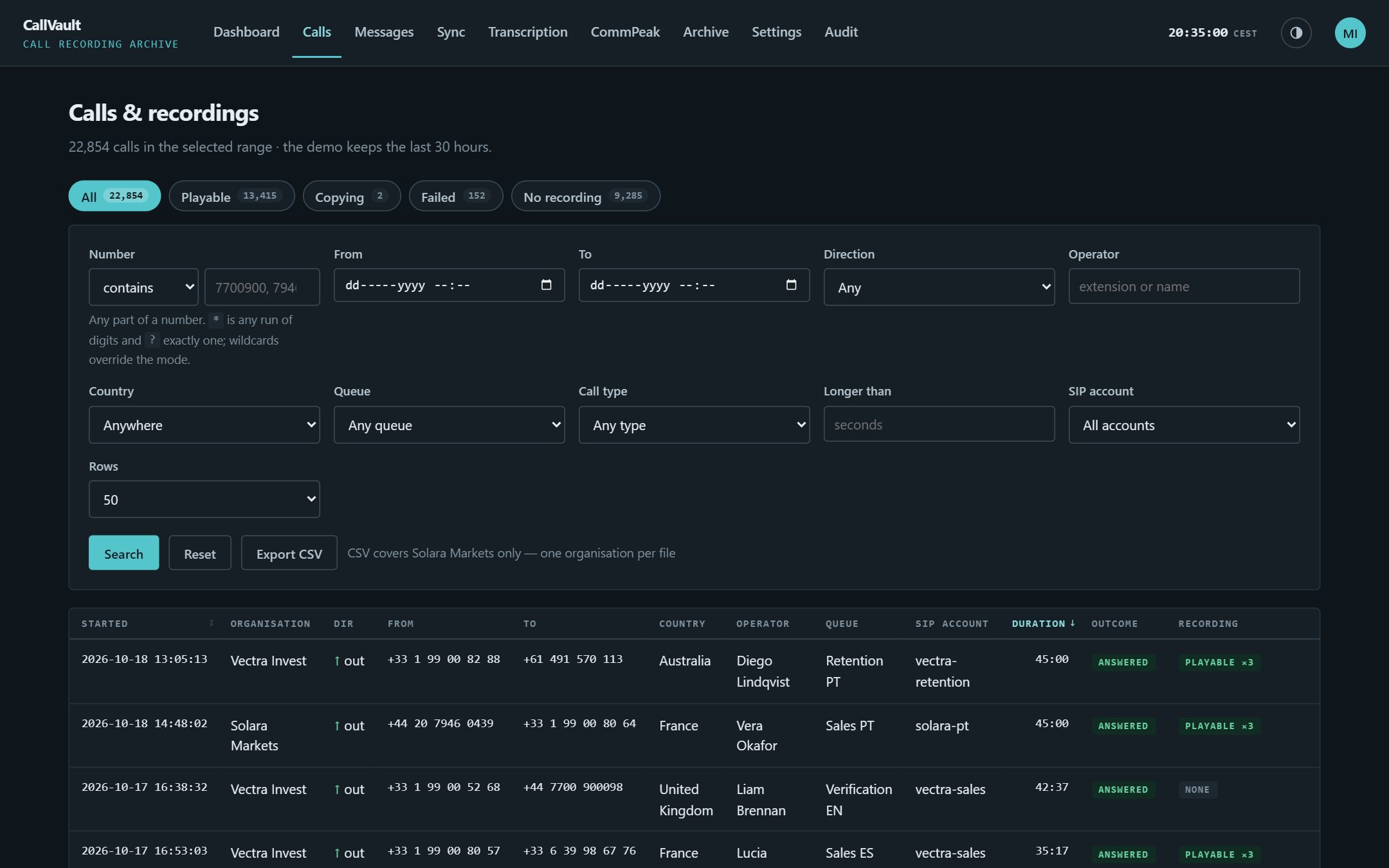
Any call,
- 1Search by any part of a number: contains, begins with, ends with, exact, or wildcards like 447700*.
- 2Filter the way supervisors ask: operator, queue, country, direction, call type, SIP account, longer than a minute.
- 3The recording state on every row: playable, copying, failed or none, and how many parts a long call was split into.
- 4Export to CSV: exactly what is on screen, one organisation at a time.
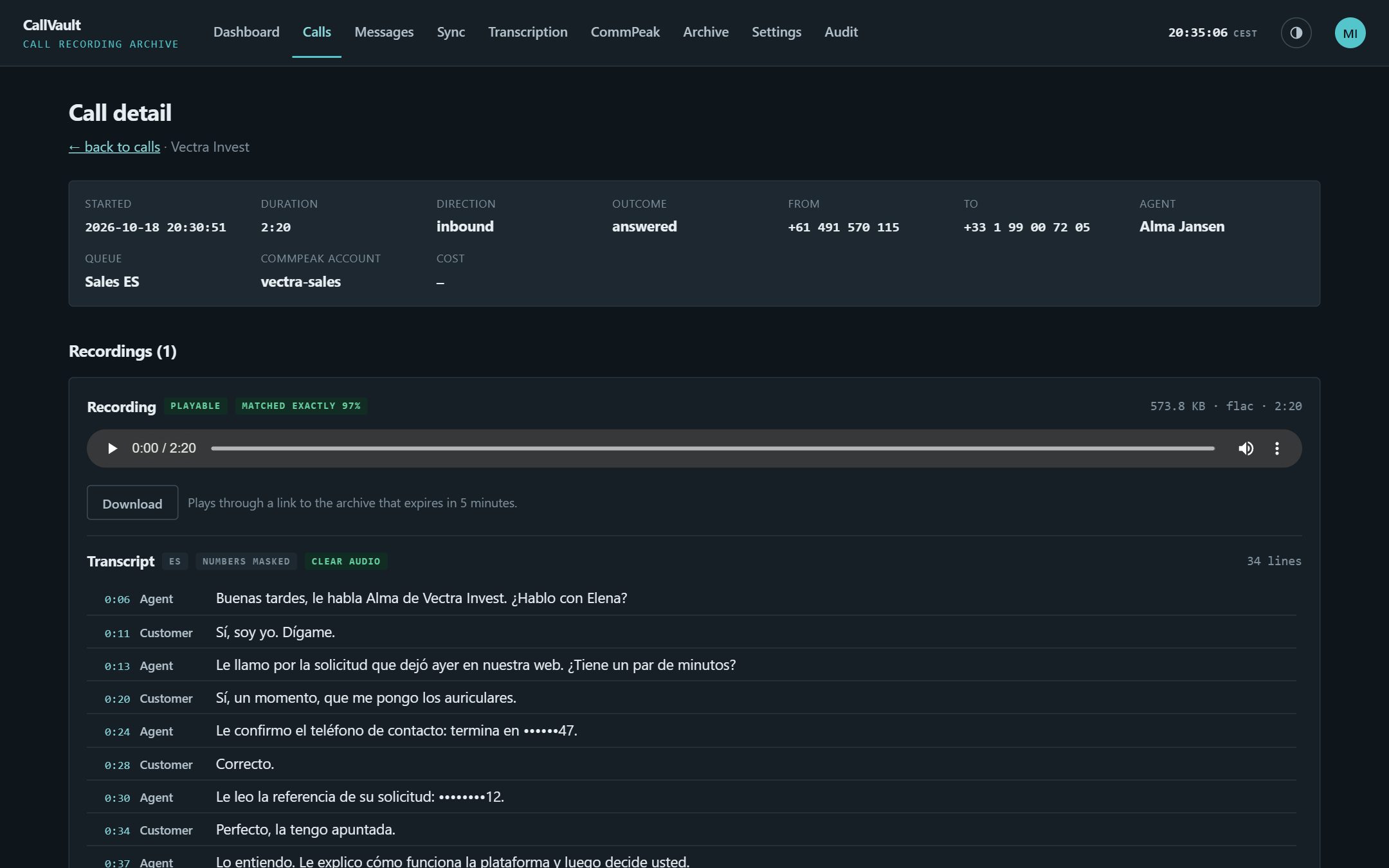
Play it. Read it. Jump to the line.
- 1Plays straight from your archive: through a link that expires in five minutes. The audio never passes through the app server.
- 2The transcript sits under the player: Agent and Customer, and every timestamp seeks the audio.
- 3Card and account numbers are masked: before the text is stored. Hold music and IVR are skipped, not transcribed.
- 4Proof on every recording: the CommPeak object, the archive object, its SHA-256 and when it was verified.
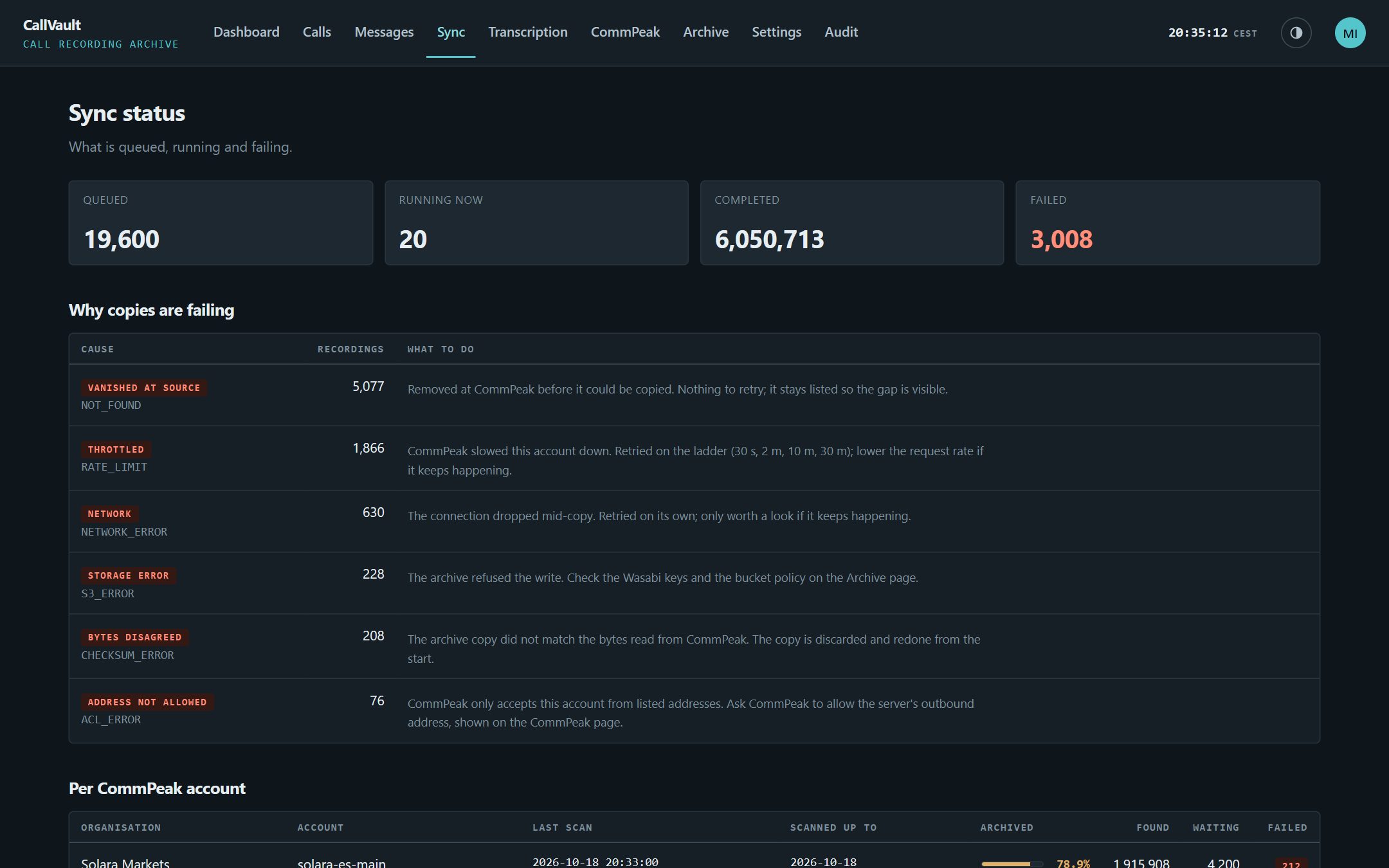
Failures that say what to do
- 1Queued, running, completed, failed: live from the job queue.
- 2Grouped by cause: throttled, wrong credentials, address not allowed, bytes disagreed. Each comes with the fix in one sentence.
- 3Retried on a ladder: of 30 s, 2 min, 10 min and 30 min, then marked failed after five attempts. Nothing is dropped quietly.
- Per account: last scan, how far back the inventory has walked, and how much is archived.
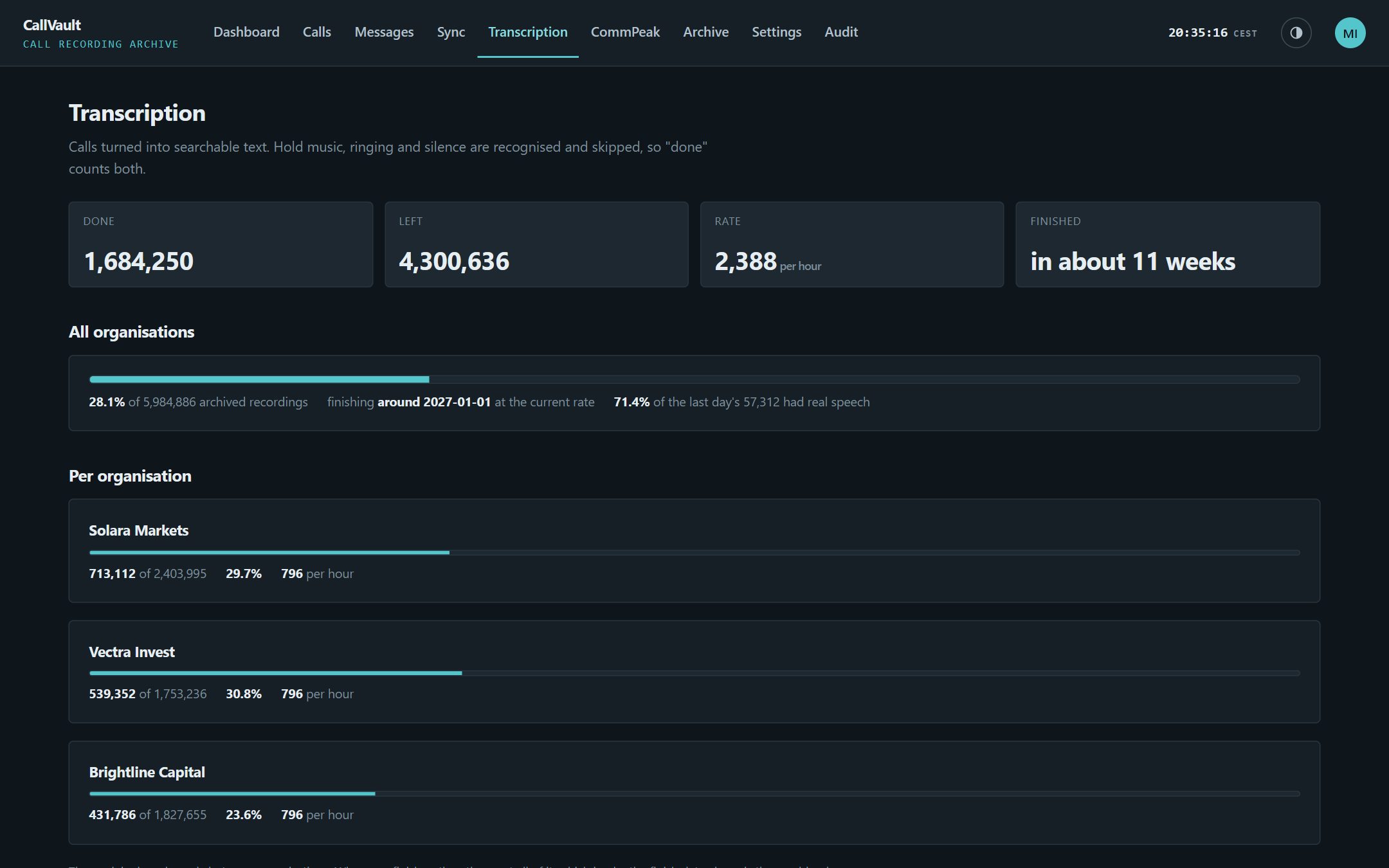
Every call as searchable text, on your hardware
- Whisper runs on your server: for the newest calls. Extra GPU machines work through the archive oldest first.
- 2No speech, no transcript: sentences heard on hundreds of calls (hold music, queue announcements, voicemail) are recognised and skipped.
- Spanish, Portuguese and English: detected per call, with an audio-quality flag on the poor ones.
- 4A finish date from the real rate: for each organisation.
From CommPeak's buckets to your team, verified
CallVault only ever reads from CommPeak. It lists the recording buckets, pulls call records from the CDR API, and writes to a Wasabi bucket in your own account.
Read-only on CommPeak
Nothing in CallVault can write to or delete from CommPeak. The ability is not in the code: every call that would change something raises an error instead.
Every byte verified
SHA-256 is computed while the recording streams through, then checked against the archive copy. A mismatch is thrown away and copied again.
The right call, or a flag
Recordings are matched to call records in five tiers, from exact channel timestamp down to time only. Two equally good matches are marked ambiguous, not guessed.
A queue that survives restarts
Jobs live in Postgres and are claimed with SKIP LOCKED. A worker that dies mid-copy loses its lease and another picks the job up.
Checked again every night
At 03:00 a reconciler compares the archive with the database and re-queues anything missing or short.
Polite to CommPeak
Requests stay under each account's rate limit. When CommPeak says slow down, that account backs off and the others keep copying.
Why it fits a contact centre like yours
Your bucket, your keys
Recordings land in a Wasabi account you own. Stored credentials are sealed with AES-256-GCM, and revealing one is logged.
Brands kept apart
Each organisation sees only its own calls, enforced in the database with row-level security, not just hidden in the interface.
Every listen on record
Admin and Operator roles, with play and download as separate permissions. Every listen, download and refusal goes into an append-only log.
The sign-in you already use
Microsoft or Google single sign-on, or local accounts with authenticator-app two-factor.
Alerts where you already look
Telegram or Slack when an account is refused, copies start failing, or the archive stops gaining on CommPeak.
Self-hosted
One Linux VM with Postgres. Recordings stream from CommPeak to Wasabi; nothing piles up on the server's disk.
Tell us what you're trying to achieve.
Book a 30-minute call or send a message and you'll reach a senior RHC Solutions consultant — not a ticket queue. Tell us how many CommPeak accounts you run and roughly how many recordings sit there, and we'll come back with a walkthrough on an estate like yours within one business day.
Everything shown in this demo is synthetic: every company, person, number and address is invented. CommPeak and Wasabi are trademarks of their respective owners; CallVault is not affiliated with either.